Your power tree, solved as you draw it.
Electronics Architect is a block-diagram editor with a circuit solver behind it. Place sources, regulators and loads, wire them up, and every node shows its voltage, current, loss and efficiency. Change a part and the whole tree updates.
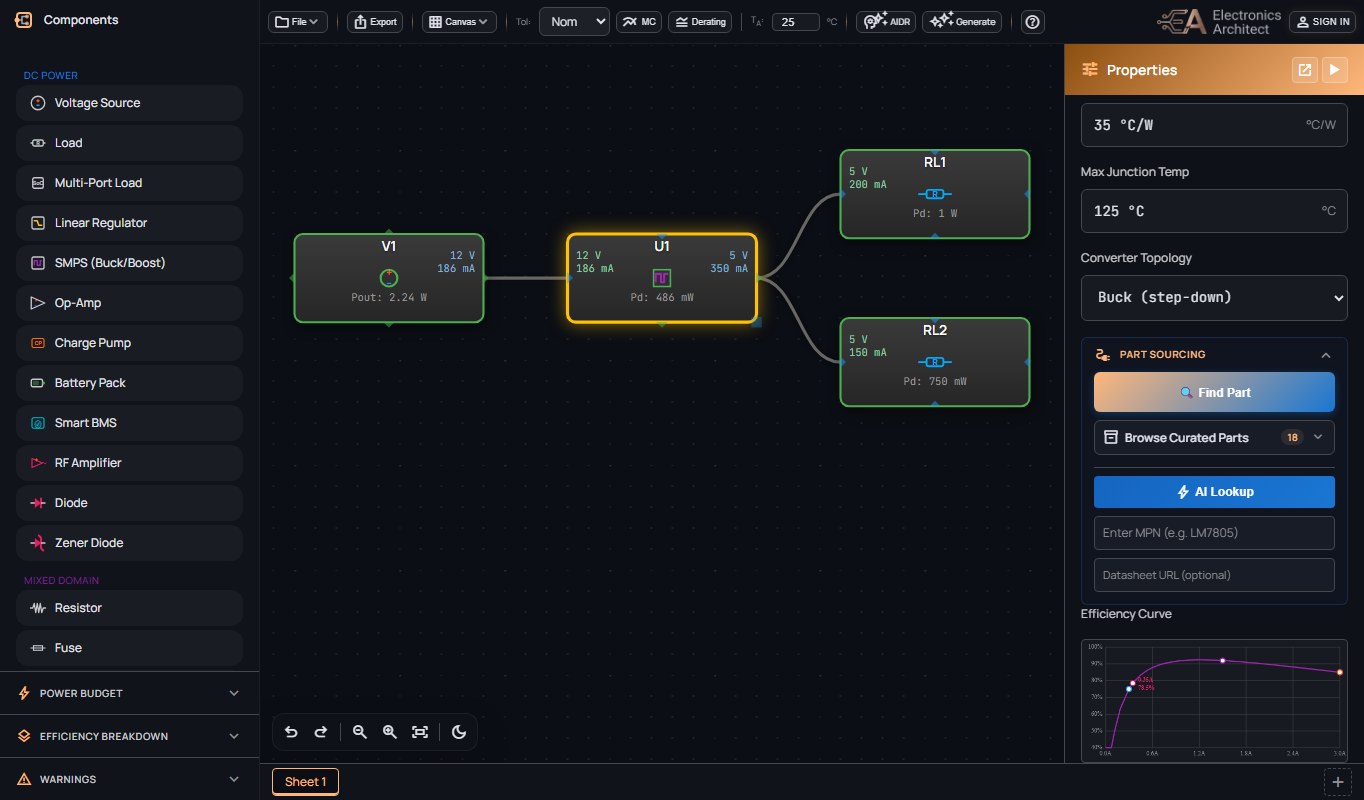
A 12 V source, a 5 V buck and two loads, placed and wired: each block solves as its wire lands. Drag the buck's light-load efficiency and the supply current and the buck's dissipation re-solve as you move it.
What it does
It is a solver with a drawing surface on top, not a drawing tool with numbers typed in.
Solved as you draw
Voltage, current, loss and efficiency on every node, DC or AC. Change one part and the whole tree updates.
Regulators that behave like their datasheets
Dropout follows load current. Pick a converter type and the solver checks it can actually make the voltage you asked for, and says so when it cannot.
Warnings you would otherwise find on the bench
A supply too weak to hold up its converter. An input filter that rings at its own frequency. A rectifier whose real peak current is several times its average.
Starts at the wall socket, if you want
Transformers, rectifiers, PFC stages, inverters and motors, single or three-phase, sit in the same drawing as the DC rails. A rectifier's input current is solved as the pulse it really is, with the power factor and harmonic check that follow.
Monte Carlo and yield
Run the design across the tolerance and temperature drift of every part. Set the limits it has to meet and get the share of units that would pass.
Real parts, with their origin
Search DigiKey from inside the design, ranked against the operating conditions already on your sheet. Paste a spec sheet and get a part. Every value shows where it came from.
Exports worth handing over
PNG, PDF with a drawing border, BOM, Monte Carlo and derating reports, or all of it bundled into one dossier.
Teams, sharing, and more than one sheet
Cloud saves, share links that expire on their own, team workspaces with roles and revision history, and large designs split across sheets with off-page connectors.
AI, where it helps
Describe what you need in plain English and it draws a first pass you can edit. Ask for a review of a design you have drawn. Values an AI read from a datasheet are marked as such.
Find out how many will pass.
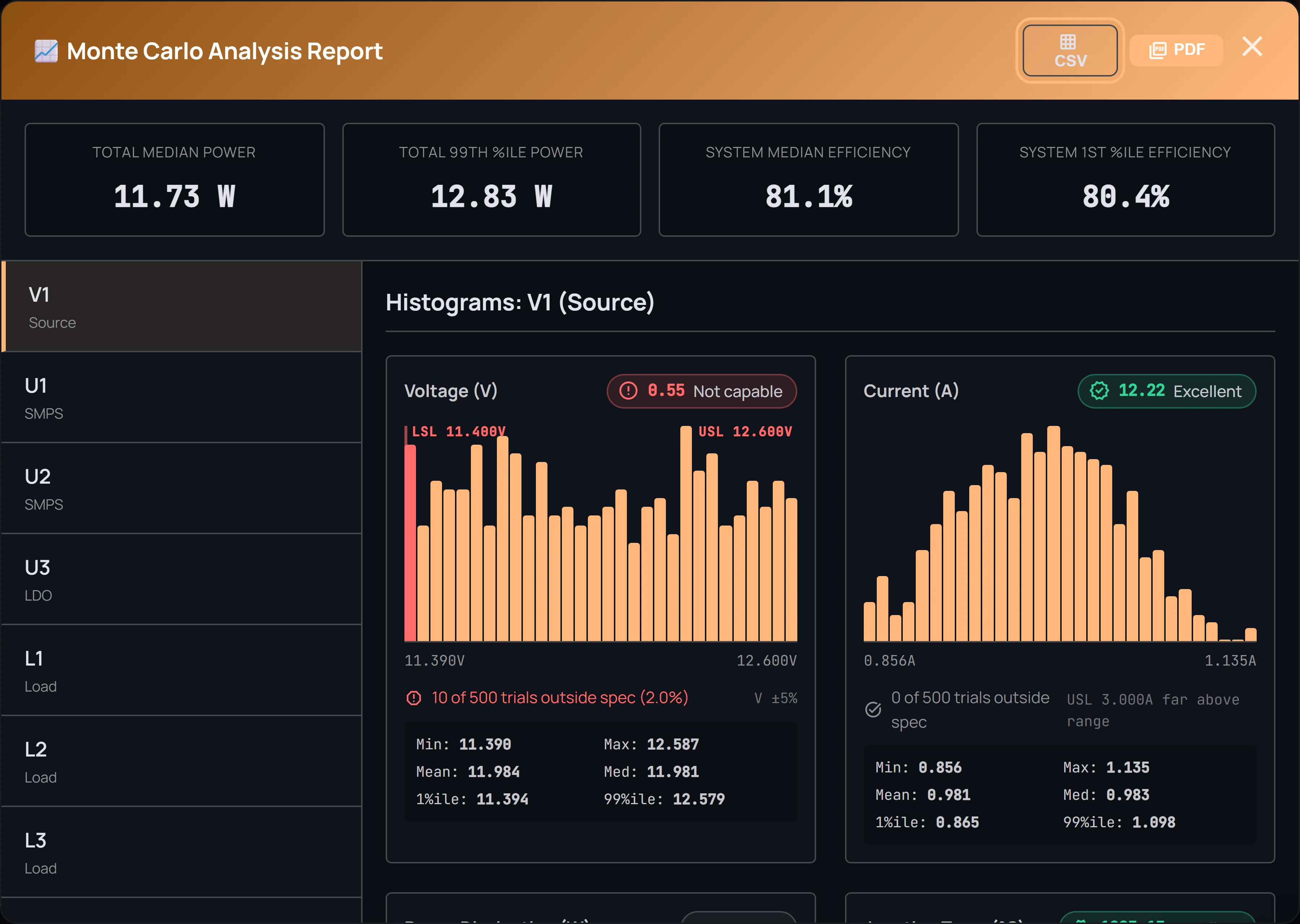
No two parts are exactly alike, even with the same part number. Give the design the limits it has to hit, run it across the tolerance of every part, and read off the share of units that would pass.
The report shows the spread on each node, and exports as CSV or PDF.
Derate against a standard, not a rule of thumb.
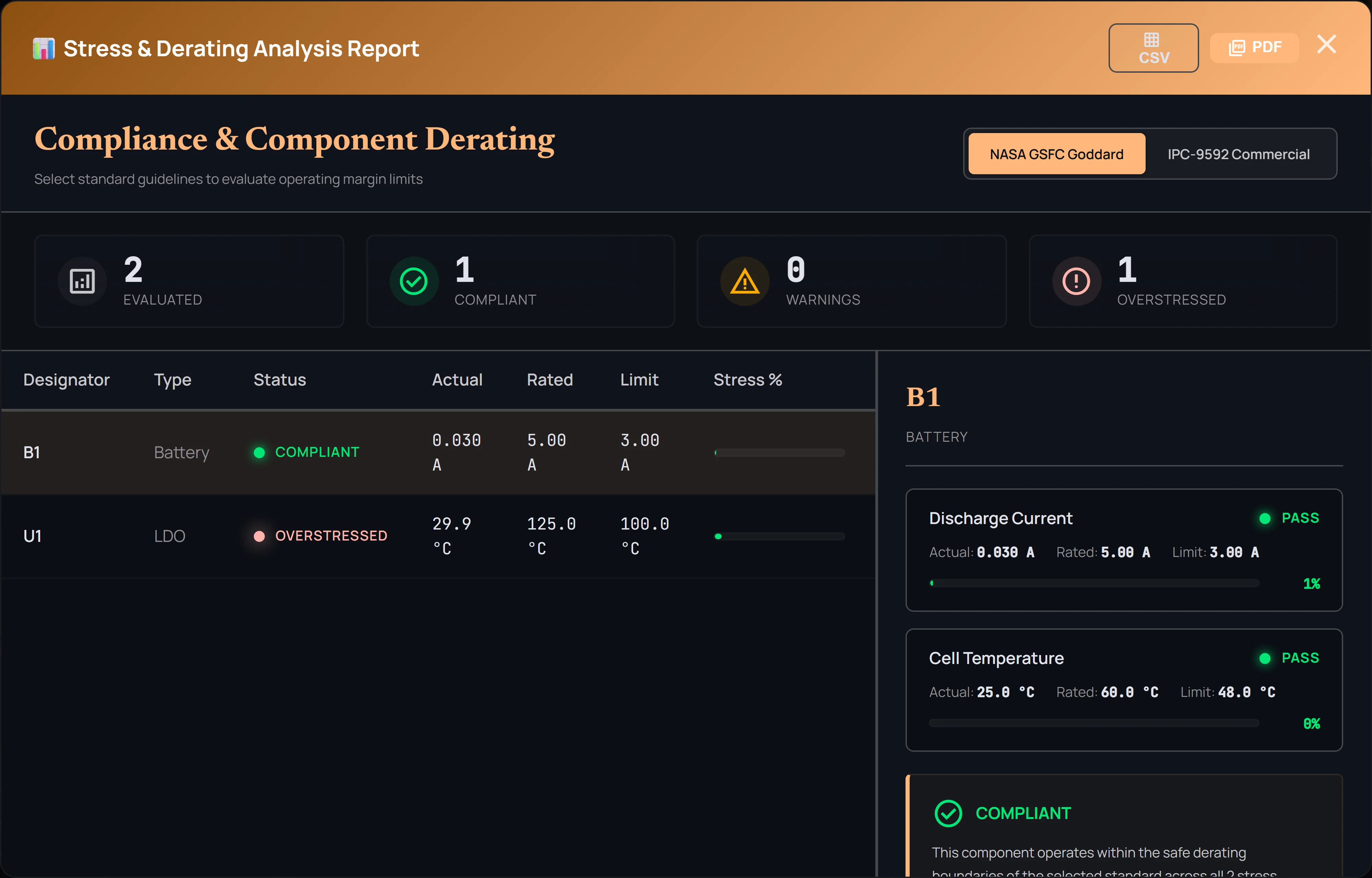
Pick NASA GSFC or IPC-9592 and every part is checked against its voltage, current, power and junction-temperature limits under that standard.
The report names the stage that is overstressed, and by how much.
How it works
Draw
Drag sources, regulators and loads onto the sheet and wire them up. Or describe the design and let it draw a first pass.
Read
Every node shows its numbers. Warnings point at the stage that needs attention. When the nominal case looks right, run Monte Carlo and derating.
Hand over
Export the drawing, the BOM and the reports, or share a link with your team or a supplier.
Pricing
Free to start. Pay when you need clean exports, more sheets, or a team.
Free
For students, hobbyists, and trying it out
- Full design canvas (1 sheet)
- Unlimited real-time power analysis
- Standard-resolution PNG export, watermarked
- 1 AI design analysis
- 1 Monte Carlo analysis
- 3 cloud saves in total
- Connect Claude or another AI app: 10 solves a month
- Not included: Multi-sheet designs
- Not included: PDF & BOM export
- Not included: DigiKey part search
Pro
For working engineers
- Everything in Free, plus:
- Multi-sheet designs
- Clean exports (no watermark)
- Vector PDF & BOM export
- MC & Derating PDF reports
- 5 AI Synthesis generations / month
- 25 AI analyses / month
- 250 Monte Carlo sims / month
- 50 revisions per design
- Unlimited cloud saves
- Local file save/load
- API keys, and unlimited solving through AI apps
Team
Shared designs for an engineering team
- Everything in Pro, plus:
- 15 AI Synthesis generations / month
- 100 AI analyses / month
- Unlimited Monte Carlo sims
- 200 revisions per design
- Multi-sheet PDF export (all sheets)
- Engineering Dossier export
- Unrestricted local file sharing
- Shared team designs: editors save, everyone sees the latest
- Revision history on every team design (who changed what)
- Role-based access (Admin / Editor / Viewer)
- Admin controls & centralized per-seat billing
- Team API keys: admins issue them, set limits and see usage per key
Pro and Team start with a 7-day free trial, one per person. Checkout takes a card and bills when the trial ends unless you cancel first.
Ran out before the month did? Pro and Team accounts can add a $5 top-up pack from inside the editor: 50 Monte Carlo sims, 20 AI analyses, or 5 AI Synthesis generations. Packs never expire and are used only after the monthly allowance.
Articles and calculators
Background on the trade-offs the solver makes for you, and seven calculators that need no account.
Articles
- The ROI of power design automation Where the hours go when the power budget lives in Visio and Excel, and what a live solver changes.
-
Being written LDO vs. SMPS for each rail, Monte Carlo for power systems, and designing multi-rail architectures.
Calculators
- Buck converter Inductor and capacitor values from input, output, load and switching frequency, with ripple.
- PCB trace width Minimum trace width per IPC-2221 for a given current and temperature rise, inner and outer layers.
- Resistor divider The cheapest standard-value pair for a tolerance you name, with an error budget and a Monte Carlo yield.
- Passive filter RC, RL, LC and RLC filters with Bode magnitude and phase, fitted to E-series values.
What's new
The latest changes, most recent first. Earlier ones are in the changelog.
Converters run hotter in a hot box, and the NASA check follows NASA's own limits
Set a design's surroundings above room temperature and a switching converter now loses more power, and runs hotter, than the same part on a cool bench, because the resistance of its switch and inductor rises with temperature the way a real part's does; below room temperature it loses less. A converter that would keep heating itself with no stable temperature is now called out as thermal runaway. For an exact figure, enter its Series R at 100% Duty from the spec sheet. The NASA parts-stress check now uses the limits NASA's own parts document sets for the parts it covers, so a few designs that passed before now show a part running too hot.
Converter efficiency at light load, and a step-down at full duty
A switching converter can now say how it runs at light load. Set Light-Load Mode to power-save and its losses fall with the load, the way most modern step-down parts behave at a few milliamps, instead of the full-speed switching loss the curve assumes otherwise. You can also enter one light-load point from the datasheet curve. A step-down converter whose input falls to its output now behaves like its switch held fully on: its output follows the input less the drop across that switch and the inductor, and the current it draws equals the current it delivers. Enter that resistance as Series R at 100% Duty for an exact figure. A step-down asked for more than its input is now marked critical, as a linear regulator is.
See the worst case, and a battery from empty to full
The tolerance menu adds Worst: each part's spec-sheet spread pushed the way that draws more power and makes more heat, so you see your design on its worst day. An AI assistant connected to Electronics Architect can now check a battery-powered design at empty, half and full charge in one step. And a step-down converter now warns when its input gets too close to its output to hold its voltage.
Use it from Claude on the free plan
A free account can now connect Claude, or another AI app, to Electronics Architect, with no card needed. Sign in once and Claude can build your power design, work out the current, efficiency and heat of every stage, and save it to your account, with 10 solves a month through Claude. The editor does the same calculations without a limit, and Pro removes the monthly limit and adds PDF and BOM export.
Long runs now count down
Monte Carlo runs, AI design reviews, AI Synthesis, exports and spec-sheet parsing now show a countdown while they work, so a long run never looks stuck. For Monte Carlo the estimate comes from the solver’s measured speed for a design your size; for the rest it comes from your own recent runs. It rounds up, so most runs finish early, and if one takes longer the meter says what it is still waiting on. While you wait, a Monte Carlo run shows parts piling up into a bell curve, an AI review sweeps across your own power tree, and a power-design tip changes every few seconds.
Draw your next power tree here.
Free to start. The demo needs no account.